Hey everyone, wanted to share my experience with Clever AI Detector. I’ve been using it for a while now, but over the past week it has basically become the only AI detector I use regularly, so I figured this was a good point to share some thoughts.
I work with text all the time, mostly assignments and some marketing side gigs, and at least part of it is usually AI-generated. Don’t judge! 🙂 Because of that, I’ve been relying on different AI detectors quite a bit to check my drafts that look too AI slop-ish and rework them before I uactualy submit or use anything.
There’s also a slightly random reason I’m posting this here specifically. Clever AI Humanizer was actually the first Clever tool I started using. I originally found it while looking around for decent AI humanizers. It’s pretty hard not to run into that one now if you search for this stuff. I’d seen people talk about it on Reddit and YouTube, and one of the reviews I read was the Clever AI Humanizer review here on Handy Recovery Advisor itself. So I figured the community of a site that had already reviewed another tool from the same ecosystem wasn’t the weirdest place to put it.
Anyway, I was already using Clever AI Humanizer for text polishing when I noticed they had added their own AI Detector. I probably wouldn’t even have noticed the Detector this early if I wasn’t already using the Humanizer. It still seems to have a pretty small online presence compared with the Humanizer. But if it keeps being as useful as it has been for me, I wouldn’t be surprised if it follows a similar path.
At first I didn’t replace anything. I just added Clever to the rotation and kept using my usual tools (mainly ZeroGPT, Copyleaks, and Turnitin depending on what I was working on). I’d run the same draft through two or three detectors, compare what they said, make some edits, and keep going.
After a while though Clever was the one I actually stayed in when I wanted to do something with the result. Over the last week that gradually turned into me opening Clever first almost every time, and eventually I stopped bothering with the others for most everyday checks.
So anyway, sorry for the long intro 🙂 Let’s get to the actual review. First, here are the things I liked most about Clever AI Detector:
- Sentence-level detection is probably the feature I like most. It highlights individual sentences and shows which parts of the text are contributing most to the result. (You get the usual percentage number too, but this gives you more to work with.)
- It is free. No account required. You can just paste text in and run a check without creating an account first. I’ve been using it quite heavily and haven’t run into the ‘you’ve used your free checks for today buddy’ message. So far.
- Up to 10,000 words per check. Enough for me.
- Easy to work with edits (especially useful when I rewrite AI-assisted text. I can change a few sections, run it again, and see whether the suspicious parts changed ).
The best thing is that it feels less like a simple YES/NO detector. To illustrate my point, here’s the same marketing text I used before, side by side with ZeroGPT.
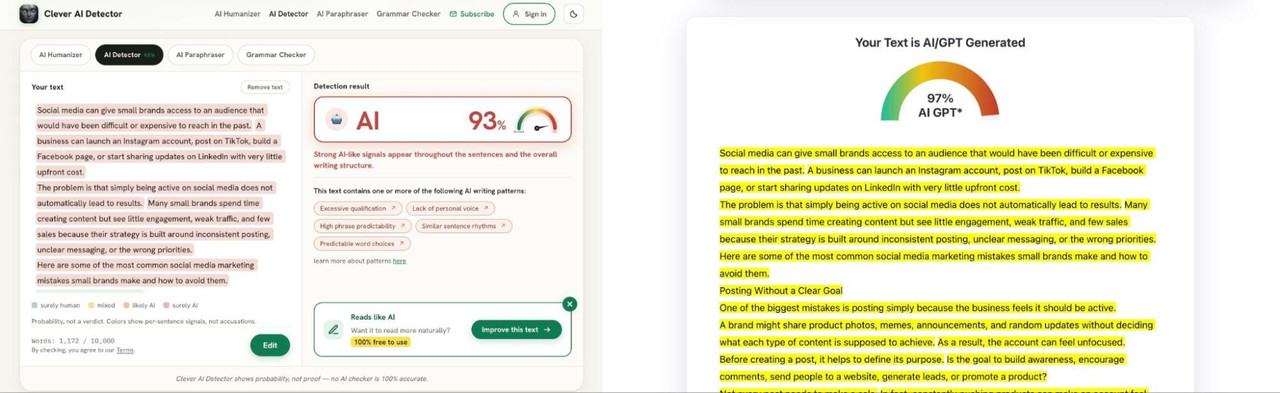
Both tools clearly agree that the text reads as AI-generated (spoiler: it is!), so on the surface the result is similar (93 % vs 97%). But Clever gives you way more to work with than just a big percentage and a wall of highlighted text. Instead of “this looks AI” it shows the overall probability AND gives some context about WHY it came to that conclusion.
In my case Clever pointed to things like: excessive qualification, lack of personal voice, similar sentence rhythms, predictable word choices…
That kind of breakdown is super helpful if you’re trying to revise the text.
Usually I handle this in one of two ways: if only a few sentences or paragraphs are dragging the score up, I may rewrite those manually. If the percentage is really high, I’ll usually send the whole thing through AI Humanizer and then clean it up afterward myself. By the way, Clever AI Detector makes that whole process easier because the detector itself offers an “Improve this text” option that sends your text straight into its humanizer companion for a rewrite. You can see the result in the screenshot below.
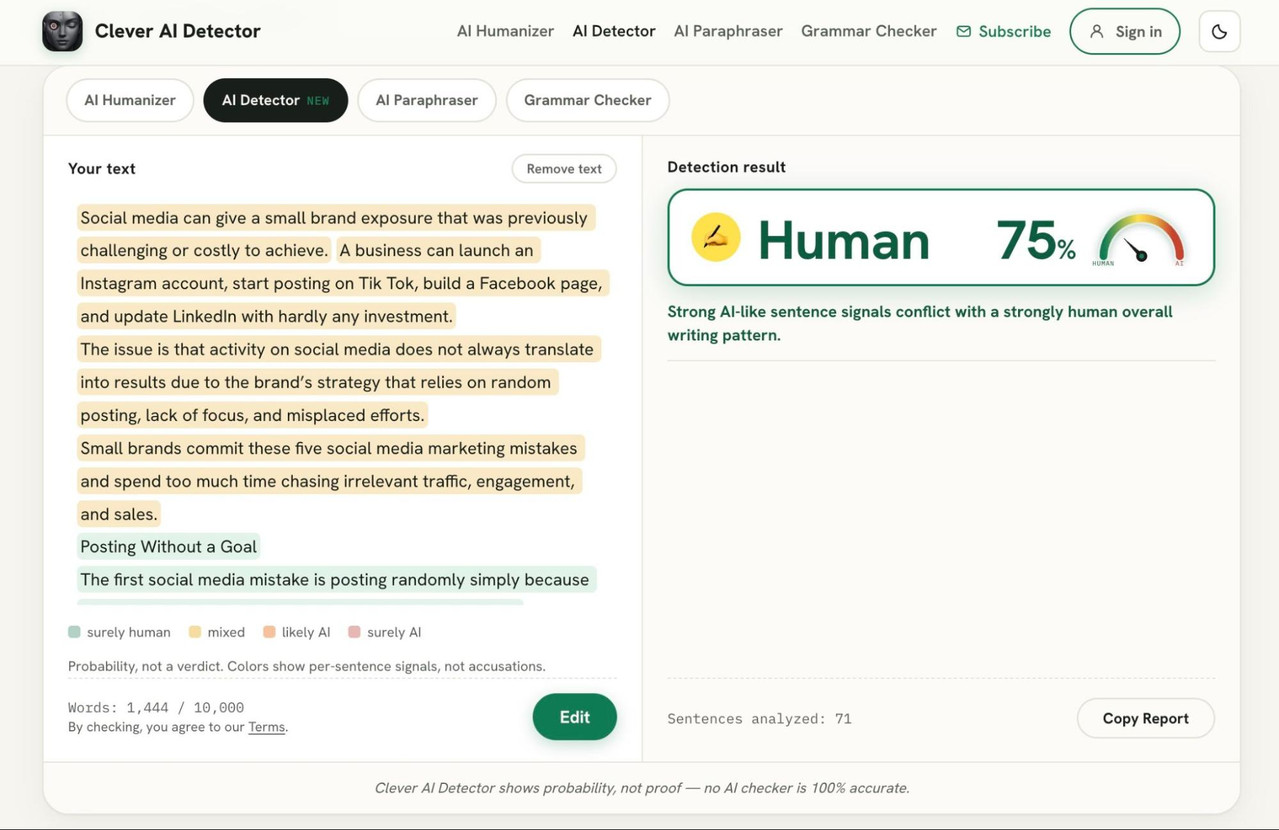
In basically 30-ish seconds I got a similar version of the same text that was now detected as 75% Human. And that was without any extra work from me. (Normally I’d still go in and tweak the wording manually to get it closer to my own style, but if your goal is just to quickly make a text look less obviously AI, that alone already gets you pretty far.)
Now, back to the detection workflow, this is probably my favorite part of the whole tool. Basically I can click Edit right there in the same window, find the lines that are flagged in red, and start reworking them based on what it says is wrong. If it points to something like “similar sentence rhythms” or “predictable word choices”, I know what kind of change I should make instead of just rewriting blindly.
Then, right after that I can rerun the detection scan and see if it improved.
That workflow sped things up for me by a LOT. Before this, I was constantly bouncing between tabs and tools… copy text here, paste into a rewriter there, move it to ZeroGPT, check the score, go back, rewrite, repeat. It worked, but it was annoying and slow. Here it is much more streamlined because the detector, the editing flow, and the humanizer are all connected.
At this point, Clever AI Detector has basically replaced all other detectors I was using before. I still ran the same texts through a few different tools this week just to compare the results, but I found myself going back to Clever every time I actually did something important.
Here’s one example from one of my latest assignments. I ran the exact same text through three detectors. From left to right, Clever AI Detector, ZeroGPT, Copyleaks:

- Clever AI Detector: 95% AI
- ZeroGPT: 95.7% AI
- Copyleaks: 100% AI
So all three basically agreed that the text is heavily AI-generated. But this is also where I realized that the number itself doesn’t help me much. Whether it says 95%, 96%, or 100%, I already know the text has a problem. What I actually need is some idea of what to fix.
Verdict: Clever AI Detector is the best AI text detector I’ve used so far. It has basically replaced all the other tools I was using before. The best part is that it shows you the problematic sections, lets you edit them manually, or send the text straight to the humanizer and then rerun the scan. That whole workflow is just much more useful. If you work with AI-generated or AI-assisted text a lot, I can definitely recommend giving it a try.