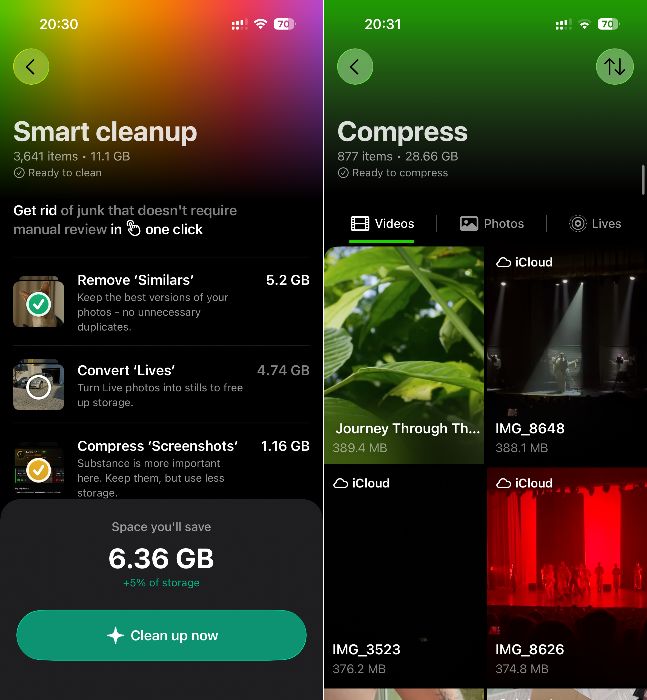
Hey everyone, I don’t usually write reviews or post stuff like this, but since I actually found this app on this site, figured someone else might wanna hear from a person who’s actually been using Clever Cleaner for over a month.
I saw it in roundup right here with a bunch of other apps and thought, might as well try it. My iPhone was screaming for free storage help and I wasn’t in the mood to scroll through 15,000 photos myself.
Overall Impression: Great, not gonna lie. The main reason I even gave it a shot is that It’s actually free. Not fake-free like most of the junk that shows up when you search “clean iphone” on App Store. So I came for the freebie, but stayed for the functionality. I’ve used pretty much all the features. Some I just tested out, others I’m still using regularly, a couple times a week at least. But most of them are genuinely useful.
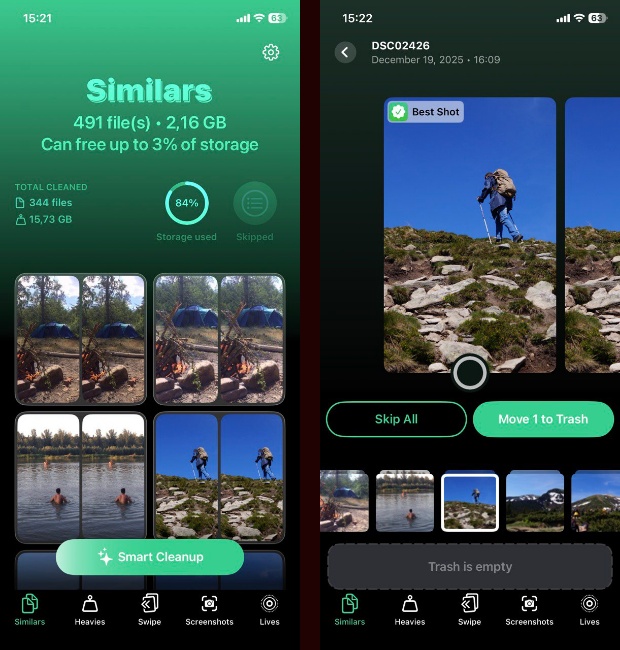
Plus, everything runs smooth on my iPhone 12, fast too, no popups. You get five tabs at the bottom, each one doing its own thing. I’ll go through each one:
Similars: best feature, hands down. It does exactly what it says finds & groups all your duplicate and similar photos. I wish iOS 26 had something like this built in, but knowing Apple, that’s not happening anytime soon. So this feature alone made the app worth it for me. I’ve got tons of near-identical stuff on my phone and Photos app never flags any of that.
Most of the time I just tapped “Smart Cleanup” and let it handle everything. It picks what it thinks is the best photo in each group, then clears the rest. In the entire month I’ve been using it, I think I disagreed with its pick maybe twice. That’s it. So pretty accurate.
No idea how it works behind the scenes. But I noticed it groups photos that look different in framing, like one from the waist up and another full-body, but still treats them as part of the same group. Loved that. Might be facial recognition idk. Either way, it never grouped totally unrelated pics. Not once. Also if you’re the type who wants more control over this, there’s also a “semiautomatic” way to go about it. You can go through each group yourself and decide what to keep or toss.
Heavies: Also great, right behind Similars and maybe Swipe, this is the one I used the most. It pulls up your largest photos and videos, sorts them, and gives you two options: delete or compress.
I had a bunch of 2-4 gb videos. For the ones I wanted to keep, I tried out the compression tool.
You get three options for video compression. I went with default (Medium) every time. It chopped the file size by 50 to 60%, easy. And quality-wise all looked the same to me. If there was a difference, I couldn’t see it.
Between this tab and the Similars feature, I cleared out somewhere between 15 and 25 gigs without losing anything I actually cared about.
Swipe: I’ll be honest never saw the point of this kind of feature. Not here, not in other apps. But it kinda won me over.
You pick a month from your photo library, and then just swipe : right to keep, left to delete. Dead simple and kind of satisfying.
Didn’t expect to use it much, but now it’s probably my most-used tab. I’ll sit down, pick a random month, and clean through it in like five minutes. Do that couple of times a week now.
Screenshots: Not much to say here. I used it maybe once, cleared out a chunk of old screen grabs in one go. But you can do the same thing in the Photos app if you know where to look.
Lives: This one lets you convert all your Live Photos into still shots (wihtout little video clip attached). I thought I didn’t have any. I turned that off years ago. But I had a bunch in there from a couple years back. Ran the tool, converted them all, now I’ve got zero.
If you like me tight on storage and not really into Live Photos, this feature seriously comes through.
Verdict: Can’t recommend this one enough. If you’re anything like me and you’ve tried apps like Cleaner Guru or Phone Cleaner in the past only to end up annoyed, disappointed or straight-up deleting them after 5 minutes give this one a shot. Clever Cleaner is hands down the best iPhone cleaner I’ve ever used. The features it comes with are more than enough for what my phone needed. I managed to clean up around 40-50% of my storage without losing anything important and without upgrading to iCloud+.