UPDATE:
Hey everyone again, decided to post a quick update since this thread is pretty old now and Clever Cleaner just got a pretty major update. I’ve never really stopped using the app since I wrote the original review. I still come back to it at least once a month for a quick cleanup. But I’ve been using the new version more actively for about a week now, and quite a lot has changed, so my original review above is a little outdated.
So what changed:
The UI is probably the first thing you’ll notice. It looks much cleaner and more modern now, and a bunch of stuff has been moved around/reorganized. Took me a minute to figure out where everything went, but after that I think I actually preferred it.
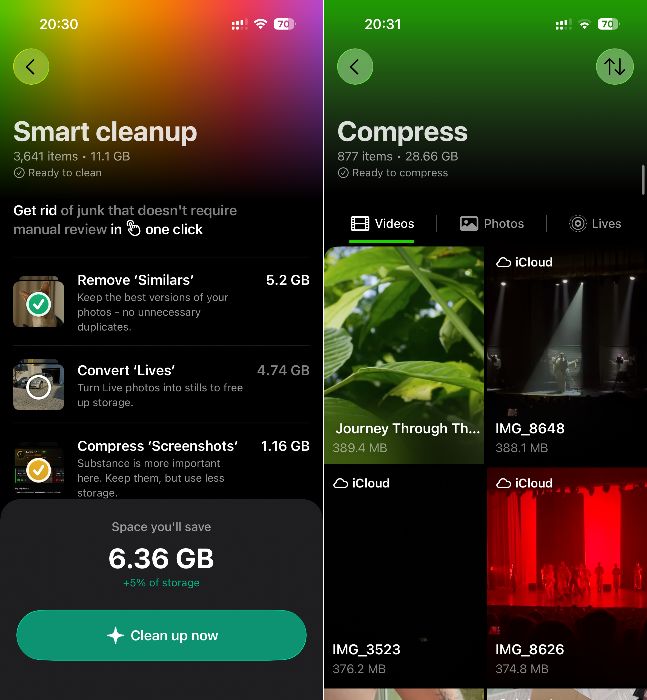
“Smart Cleanup” is still here, but now it does more than sort out & clean up Similars automatically. It can also convert Live Photos and compress screenshots as part of the same cleanup. No complaints from me there. Basically three birds with one stone.
Instead of “Heavies”, there’s now a dedicated “Videos" section, which honestly makes more sense. Pretty much everything you might want to do with videos is gathered in one place. You can clean up the largest ones like in the old version, use Swipe specifically for videos, or compress them.
Video compression still has the same three levels: Optimal, Medium, Max. Medium is still the sweet spot for me. It saves a LOT of space, and I still can’t really notice any downgrade in the actual video quality.
The same idea of giving you a few different ways to deal with your files is now used for "Live photos" and "Screenshots" too. You can clean them automatically, go through them with Swipe, or compress them. I like this approach a lot more. The “Screenshots” section actually makes a lot more sense now too. Before, it mostly was a way to open the same screenshots you could already find in the Photos app. Now it adds some real utility on top, like sorting screenshots by size and compression.
"Swipe" is also still there as a separate feature, and I’m still using it. Funny, because that was probably the feature I cared about the least when I first downloaded the app. It’s more versatile now. You can basically filter exactly what you want to swipe through: Recent, Favorites, Videos/ Live Photos only. Again, no complaints. Gives you more control over what you’re cleaning.
The other big change is monetization. Clever Cleaner has paid options now, although from what I’ve read the free limits are pretty generous and you can still do a useful amount of cleaning without paying.
And one thing I specifically wanted to come back here and mention, the developers DID actually keep the promise I talked about earlier in this thread. My account is still fully free as an early adopter. No subscription appeared, nothing got taken away from me. I’m pretty happy I downloaded it when I did, and also that I told a few friends to grab it back then.
Verdict: One week into Clever Cleaner 3.0, it still gets a recommendation from me. It’s changed a lot visually, but it hasn’t turned into one of those cleaner apps where every tap leads to a paywall. If anything changes after I’ve used 3.0 longer, I’ll try to update this again.